
Best friends, shared spotlight
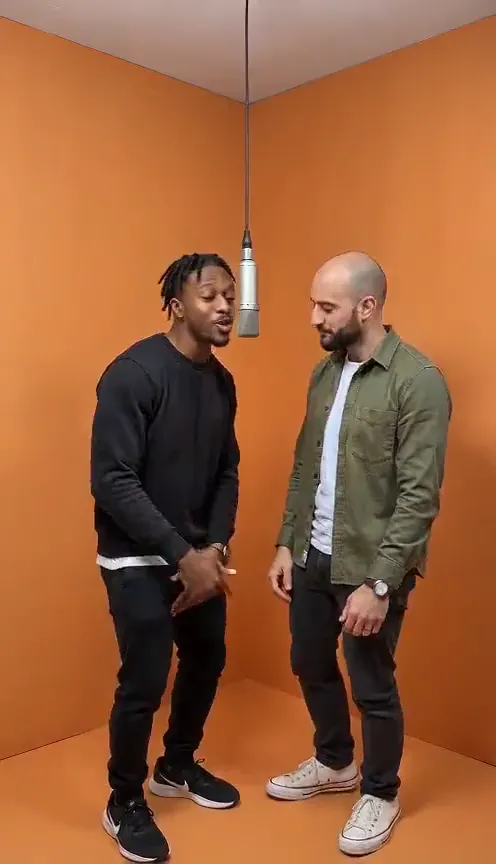
A relaxed two-person performance: black and olive layers, small gestures, and a microphone between the pair.
Use one clear portrait per person. Keep both outfits and faces distinct in your direction.
Your favorite duo. One orange studio. A scene worth sharing.
Your faces. The orange booth. One shared spotlight.
A relaxed two-person performance: black and olive layers, small gestures, and a microphone between the pair.
Style reference · This is an example, not your generated video.Music is separate. Add audio you have permission to use when editing your finished clip.
Friends, couples, or an unexpected animal duo. Preview each performance, then borrow a direction for your own cast.
A relaxed two-person performance: black and olive layers, small gestures, and a microphone between the pair.
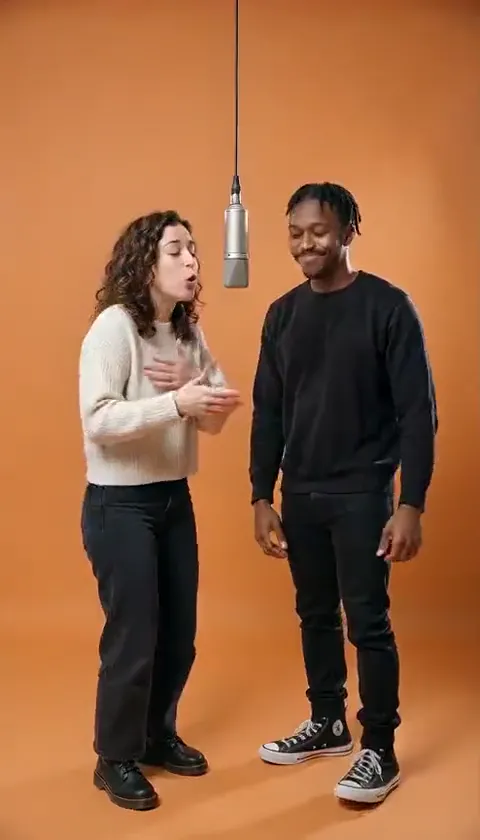
A cream top and a dark sweatshirt give this duo a clear visual contrast against the orange set.
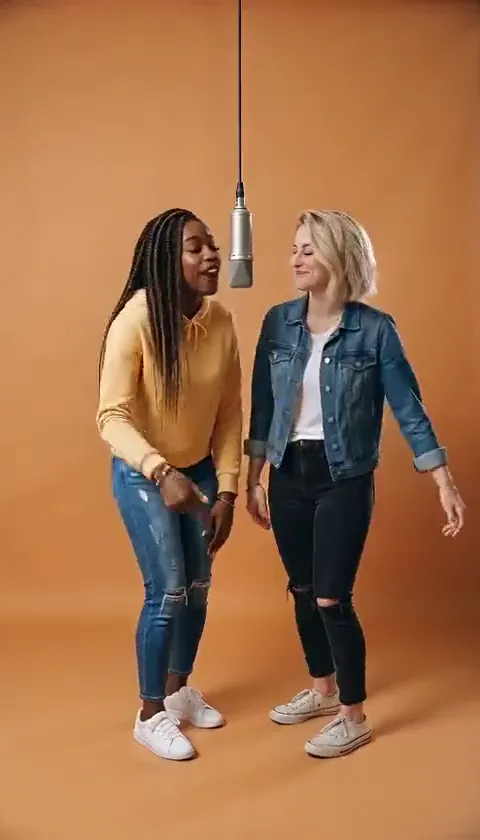
Two women in yellow and denim bring a shared-photo pairing into the orange studio.
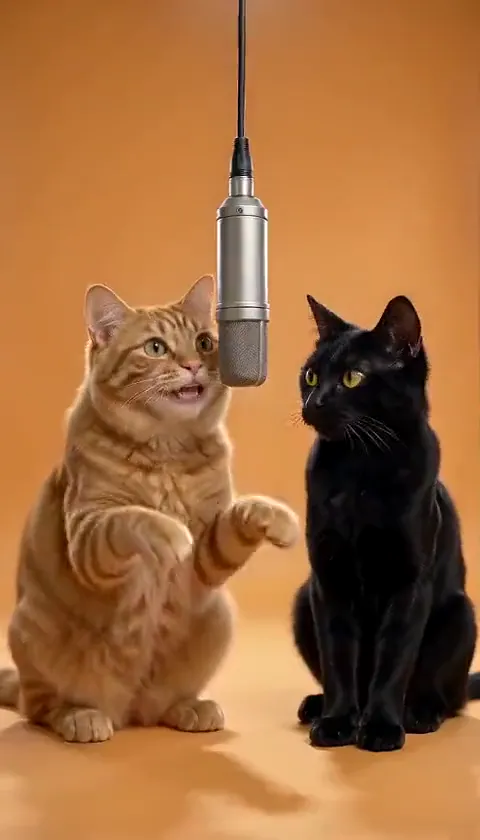
A ginger tabby and a black cat become a playful duet, each with a recognizable coat and silhouette.
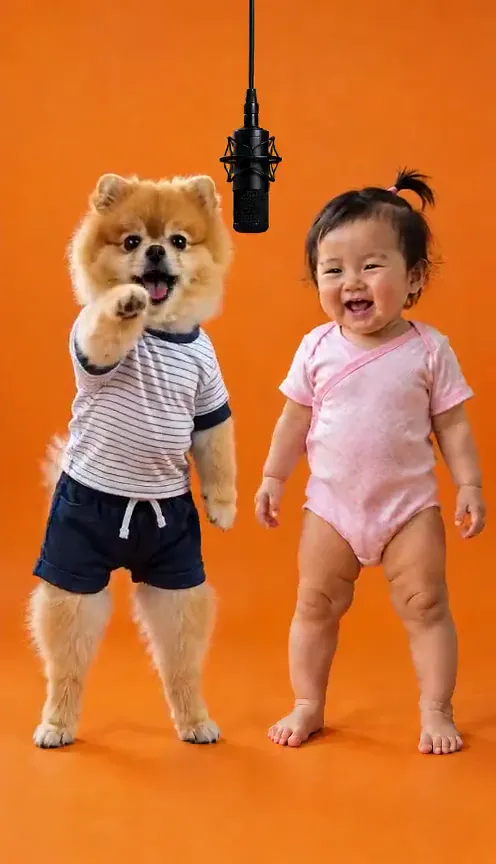
A cheerful child and a Pomeranian share the microphone in an exaggerated, playful studio scene.
Silent style references, not outputs from your photos. Choosing a direction keeps your photos and edited prompt in place.
The Hotel Lobby video template puts the focus on your two stars: an orange backdrop, a suspended microphone, and a relaxed performance straight to camera. Start with friends, a couple, or a person-and-pet pairing.
Keep the set simple so your subjects carry the scene.
Describe who leads, who reacts, and the mood they share.
A frontal shot and small gestures make a clearer starting brief.
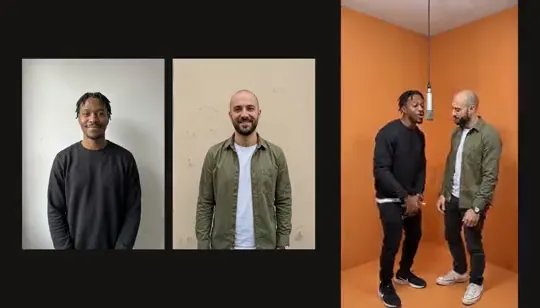
This paired reference shows the two portraits alongside their orange-booth example. Each subject has a clear face and recognizable clothing, giving the duo a useful visual starting point.
The same friends example shown above, with its corresponding input portraits. This comparison is a reference, not a result generated in this workspace.Set up my Hotel Lobby videoChoose a direction
Choose a direction, read the full prompt and apply it to your workspace. Your uploads and personal notes stay in place; you can undo the prompt change.
Use the uploaded people as identity references for a Hotel Lobby style remix. Place them standing together in an orange recording booth beneath a suspended microphone. Keep their original outfits and add one relaxed shared gesture. Keep their facial features distinct and their positions consistent. Use a steady medium shot and settle on a confident pose.
Create a Hotel Lobby inspired scene with the two uploaded friends standing side by side in an orange recording booth under a suspended microphone. Preserve their individual faces and hairstyles. Give each person a small synchronized head turn, followed by a relaxed smile. Keep the microphone, orange background and soft lighting stable throughout.
Use the people in the shared photo to build a Hotel Lobby inspired performance in an orange recording booth with a hanging microphone. Keep their left-to-right order and recognizable facial features. Add a subtle shoulder movement and a shared glance. Avoid overlapping faces or changing the number of people.
Create a playful Hotel Lobby style scene from the uploaded pets. Preserve each animal’s fur markings, ears and relative size. Place them together beneath a microphone against the orange recording-booth background. Add one small head tilt and keep their anatomy natural, without human hands.
Turn the uploaded duo into a playful Hotel Lobby inspired performance in an orange recording booth. Preserve each person or pet, their relative size, clothing and defining features. Add a suspended microphone between them. Use a steady camera, a small confident gesture and a calm final pose. Keep the background uncluttered.
Build a Hotel Lobby inspired scene with the uploaded subjects standing beneath a microphone in an orange recording booth. Preserve their faces and relative positions. Use a very slow camera push-in, a subtle shared glance and stable soft lighting. Finish with both subjects clearly visible; avoid sudden cuts or costume changes.
These prompts are alternative creative directions using the same reference format. The preview clips are references, not six separately generated results or guaranteed choreography.
Add a separate photo for each subject, or switch to one photo together. Pick images with clear faces and enough room around the body.
Keep the orange-studio template or edit its prompt. Add a short note about wardrobe, gestures, or the way your duo interacts.
Review your photo and scene direction, then copy or download the creative brief to keep everything together.
Use front-facing or gentle three-quarter views in even light. Avoid sunglasses, heavy filters, tiny faces, and objects covering facial features.
Waist-up or full-body photos give more visual context than a tight selfie. In a shared photo, choose two clearly separated subjects.
Name the animal and its markings. If you want a playful upright pose, say so; facial identity and anatomy still depend on the eventual model.
Try a head nod, a glance, or a simple hand gesture. Complex choreography and exact lip sync need suitable generation controls.
Use these checks to refine your photo-to-video idea, from the input photo to movement and framing.
Choose sharper reference photos with similar lighting. Name each subject separately in the notes and ask to preserve their distinctive features. Avoid adding a long list of appearance changes.
Use one subject per portrait, or a shared photo with a visible gap between them. Specify who stands on the left and right, and keep hands and faces from overlapping.
Give one subject a small lead gesture and the other a simple reaction. Keep the camera fixed; save spins, fast cuts and full choreography for a different video idea.
Click a reference to hear its original audio when available. Your creative brief describes the visual rhythm; a text prompt alone does not guarantee exact lip sync or a specific song.
It is a photo-based scene concept for a duo performing in an orange studio with a hanging microphone. This tool helps you personalize the subjects, scene prompt, and direction in one place.
Use Two portraits for one photo of each subject. Use One photo together when both subjects are clearly visible in the same image. Only the photos for the selected mode are included in your brief.
You can prepare a person-and-pet or two-pet idea. Use a clear animal photo and describe its appearance and intended pose. The example is inspiration; an identical performance is not guaranteed.
Choose a reference photo, select a scene direction and personalize the prompt. Review the clothing, camera and movement details, then copy or download your creative brief.
Photos stay in this browser session for the preview and are not uploaded by this tool. Reloading clears them. A downloaded brief contains filenames and text, not the image files themselves.
Reference clips play with their original audio when available after you click. The creative brief does not include that soundtrack. Music, precise timing and lip sync for your own output depend on the connected model and editing workflow.
Keep exploring
Choose the workspace that fits the shot you have in mind.
Bring expressions, illustrations and still scenes into motion.
Turn a portrait into a character-led club reaction brief.
Plan a football bounce with a three-view character card.
Use four character views to plan a consistent full turn.
Give your motion a starting point and a destination.
Plan light, camera movement and product detail.
Pick your duo and make the orange studio your own.
Set up my Hotel Lobby video