Skip to workspace
Cinematic car stunt

Unbothered Car Stunt AI Video

Let the vehicle make the entrance. Keep your character completely composed. Plan a cinematic contrast between a quiet foreground and a dramatic stunt behind it.

Make this idea yours

Start with a reference image. Shape the direction.

01

Add your reference

Required

One person, a clear face and even light. Include shoulders and the outfit you want to keep.

Required

Show the full car, truck or motorcycle, including wheels. Use one vehicle per image.

Add a portrait for the seated character and a separate photo of the vehicle. A three-quarter vehicle view with all wheels visible gives useful shape and color detail.

Drafts stay in this tab for 30 minutes between visits. Reloading clears the draft.

Choose a scene direction

Choose a direction to update the prompt. Your photos and notes stay in place.

02

Director’s notes

Optional
0/600
Customize your prompt

Personalize the photos, scene and prompt for your video idea.

Unbothered Car Stunt AI Video
Stunt scene reference

Reference example. Click to play with original sound.

All the action. None of the reaction.

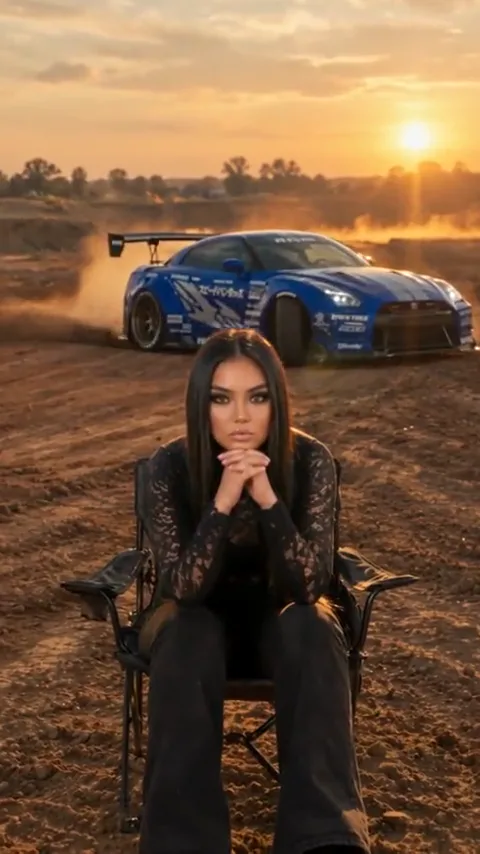
The seated character anchors the foreground while the vehicle supplies motion, scale and dust. Keep the two paths separate so the contrast stays clear.

  • Establish the calm
  • Bring in the vehicle
  • Hold the contrast

Scene directions

Read the reference in three moments.

Use these frames to plan the setup, main action and ending. Click the full reference above to watch the motion with its original audio.

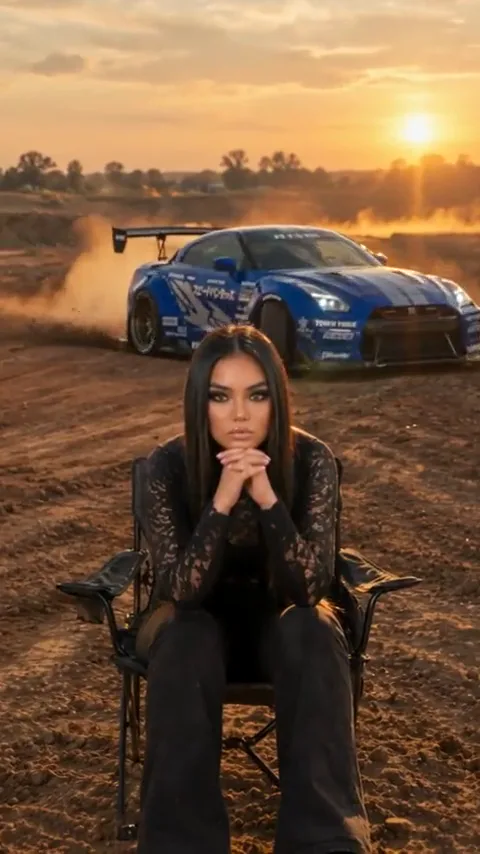
  1. Approach behind the chair

    Approach behind the chair

    The car begins at a distance behind the seated character. The still foreground gives the vehicle’s approach a clear point of comparison.

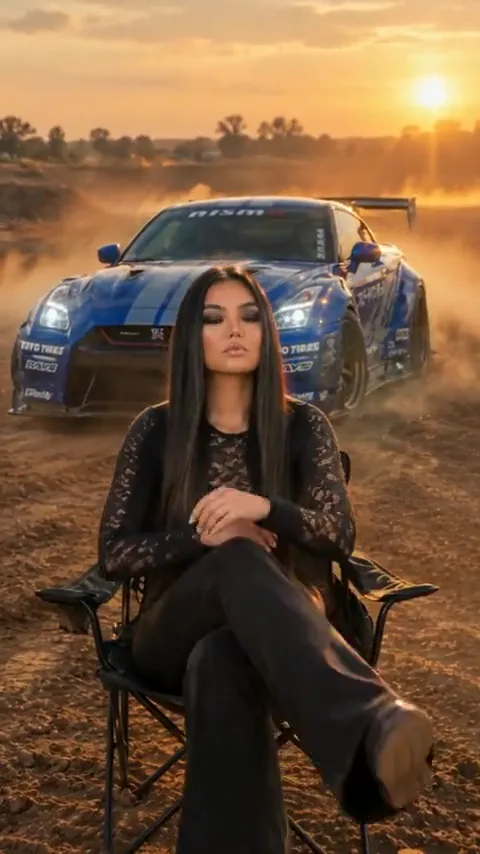
  2. Read the sideways drift

    Read the sideways drift

    The car swings into a sideways movement behind the chair. Keep its route, wheels and relative scale readable in your own direction.

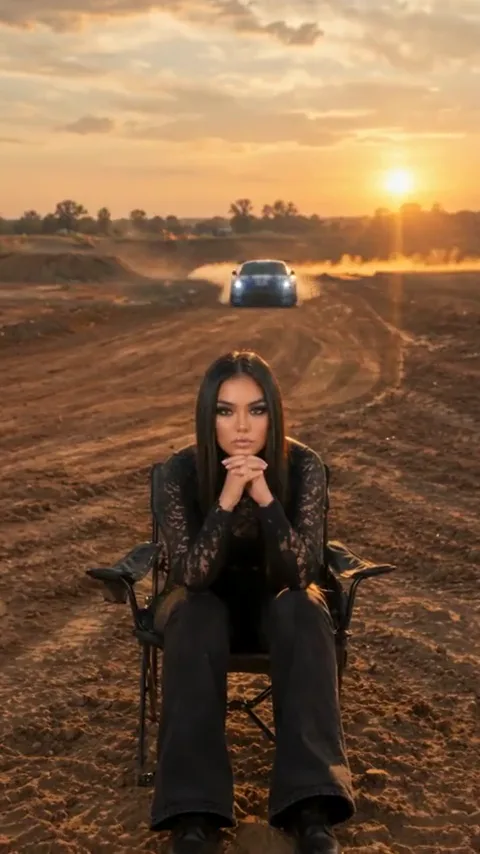
  3. Stay composed as it settles

    Stay composed as it settles

    The vehicle settles behind the seated woman as she crosses her legs. A small, unhurried gesture keeps the unbothered contrast intact.

These are three moments from the same source clip, not three different generated examples.

Make the scene your own

Unbothered AI car stunt prompts to customize.

Choose a starting point, copy it or apply it to the workspace. Your uploaded references stay in their assigned slots.

6 prompts
Car drift
Car drift

Car drift

Use the uploaded person and car as separate references in a fictional golden-hour dirt-track scene. Keep the person seated calmly in a fixed foreground position. The car enters on a distant background path, makes one broad drifting arc, then stops behind with clear separation. Preserve face, chair, body panels, color and all four wheels. Keep dust behind the car and finish on a still wide composition without collision or cuts.
Truck jump
Truck jump

Truck jump

Create a fictional visual-effects scene on an open dirt course. The uploaded person sits motionless in a foreground chair. The referenced truck makes one modest jump over a distant background rise, lands with consistent wheel contact and settles behind at a clear distance. Keep truck proportions, body color, wheel count and the person’s identity stable. Use a fixed wide camera, dust behind the vehicle and no contact with the person.

Motorcycle pass
Motorcycle

Motorcycle pass

In a fictional cinematic dirt-course scene, keep the uploaded person seated calmly in the foreground. The referenced motorcycle, with a helmeted rider, makes one small background leap over a rise and lands on a clearly separated route before slowing down. Preserve bike shape, color and two wheels, along with rider balance and the lead’s face. Hold a wide camera and end with a composed foreground. No collision, contact or sudden cuts.

A slow rolling arrival
Car drift

A slow rolling arrival

Create a fictional golden-hour vehicle scene with the uploaded person sitting calmly in a foreground camp chair. The referenced car rolls slowly along a background dirt path, makes a gentle turn and stops at a visible distance behind the person. Preserve face, clothes, chair, car color, body proportions and four wheels. Hold the camera still, use only a light dust trail and end on a clear composition. No jump, contact or collision.

A truck crest and settle
Truck jump

A truck crest and settle

Use the uploaded person and truck in a fictional wide dirt-track composition. Keep the person seated and motionless in the foreground. The truck travels over a low background rise with its tires staying near the ground, descends and stops. Preserve wheel count, suspension proportions, paint color and the character’s face. Keep a clear distance between both subjects, a fixed camera and dust behind the truck. Finish with both still.

A motorcycle roll-by
Motorcycle

A motorcycle roll-by

Place the uploaded person in a camp chair at the front of a fictional open dirt-course scene. The referenced motorcycle and a helmeted rider travel slowly along a separate background route, then stop well behind the chair. Keep the person composed and the camera locked. Preserve motorcycle design, two wheels, rider posture and the lead’s identity. Use a small dust trail and a clean final hold without a jump, collision or added text.

Six original prompts explore one source reference. Direction variants are ideas to try, not separate finished results or the original prompts used for the clip.

THE INPUT GUIDE

One person. One vehicle. Two clear references.

Add a portrait for the seated character and a separate photo of the vehicle. A three-quarter vehicle view with all wheels visible gives useful shape and color detail.

Give the idea a clear starting point.

Required

Main character

One person, a clear face and even light. Include shoulders and the outfit you want to keep.

Required

Your vehicle

Show the full car, truck or motorcycle, including wheels. Use one vehicle per image.

FROM REFERENCE TO BRIEF

How to plan your Unbothered Car Stunt video.

01

Add the person and vehicle separately

Use a clear portrait for identity and a full vehicle photo for shape, color and wheels. Keep both references in their labeled slots.

02

Choose one vehicle action

Match the direction to the vehicle: a broad car drift, a truck jump or a motorcycle pass. Specify a foreground chair and a separate background route.

03

Plan the final hold

Save the brief with a settled ending. Before sharing a result, review the vehicle anatomy, landing or wheel contact, and the space separating the vehicle from the character.

SMALL DETAILS, BETTER DIRECTION

Prepare a clearer video brief.

Show the complete vehicle

A three-quarter view with every wheel visible is more informative than a close crop of the grille. Avoid a second vehicle overlapping the body.

Keep the foreground still

One small glance is enough if you want a reaction at all. A large flinch changes the premise from unbothered to startled.

Draw a clear background route

Describe where the vehicle enters, turns and stops. Keep that route behind the seated character instead of crossing the foreground.

Let dust support the action

A dust trail can clarify direction, but a full cloud hides wheels and identity. Ask for dust behind the vehicle and a clean final view.

A scene that holds together

Write two subjects and one clear boundary.

The person reference and vehicle reference serve different roles. Keep their identity instructions separate, then define the space connecting the two.

The person
Preserve face, clothing and seated posture. Name the chair and keep the foreground position stable.
The vehicle
Preserve body shape, color, wheel count and scale. Choose one action appropriate to the uploaded car, truck or motorcycle.
The distance
Keep the vehicle route behind the character with visible separation. End with dust clearing and both subjects easy to read.

Unbothered Car Stunt AI Video FAQ

What is the Unbothered car stunt AI video template?

It is a staged cinematic concept where a calm seated person stays still while a vehicle performs a dramatic move behind them. The contrast between the foreground and background is the main visual idea.

How many photos do I need?

Two separate images: one of the person and one of the vehicle. The workspace keeps them in distinct slots so the brief can assign each reference a clear role.

Can I use a truck or motorcycle instead of a car?

Yes. Choose the matching direction and upload that type of vehicle. The prompt changes the action and wheel expectations; it does not convert a car photo into a different vehicle automatically.

What should an AI car stunt prompt preserve?

Name the vehicle color, body shape, wheel count and proportions, as well as the person’s identity and chair position. Define a separate background route and a clear ending.

Why does the reference use a seated character?

A still seated pose creates a stable foreground. It makes the vehicle movement easier to read and carries the unbothered joke without extra gestures.

Does the prompt guarantee realistic drifting or landing physics?

No. Wheel contact, suspension, object scale and body geometry remain difficult details for generated action. Review them in the eventual output and simplify the action when needed.

Does this workspace generate a personalized video now?

Organize your images, choose a direction and refine the prompt. Save the creative brief with your source photos so the scene stays consistent throughout your project.

The vehicle moves. You stay unbothered.

Add both references and give the action a clear path behind you.

Build your scene briefPersonalize the scene and keep your photos, prompt and direction together.