Skip to workspace

Fashion in motion

AI Fashion Model Video Generator

Give your outfit movement. Direct the model, show the fabric and keep the garment at the center.

Your creative brief

Choose a clear JPG, PNG or WebP showing the model and the actual outfit. Include the hem and hands when possible.

Your on-model fashion photo
JPG, PNG or WebP · max 10 MB each
Direct the fashion shot

Measured steps with the complete outfit in view.

Scene prompt
Garment details to preserve

Refine your idea, review the direction and export your creative brief.

Images stay in this tab. Drafts survive in-site navigation for 30 minutes; a reload clears them.
Reference preview
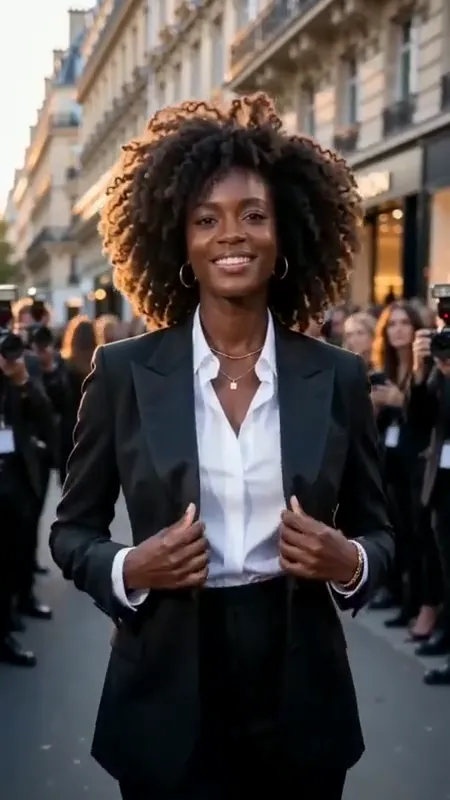
A tailored look on the city street

A model in a black suit moves along a city street and adjusts her jacket. Study the pace and the readable outfit.

Reference clip, not a result from your upload.

Direct the outfit

Three ways to make the garment the focus.

Build an AI fashion video around the actual outfit. Choose motion that shows the silhouette, the pose or the material without asking for a new design.

Give the silhouette room to move.

Reference clip, not a result from your upload.

Runway walk

Give the silhouette room to move.

The city-street reference keeps a tailored black outfit readable as the model walks and adjusts her jacket. For your own shot, leave room around the silhouette and finish on a stable pose.

  • Full outfit
  • Measured steps
  • Clear final pose

Use a full-body reference for a full-body walk. A cropped image cannot establish the missing hem, shoes or lower-body fit.
A small turn. A different impression.

Reference clip, not a result from your upload.

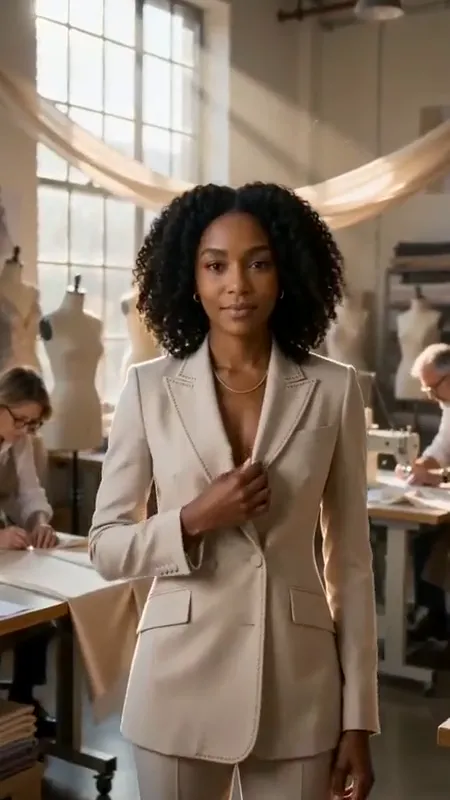
Editorial turn

A small turn. A different impression.

In the studio reference, a model in a beige suit lightly touches her lapel and turns. Use a small gesture for a lookbook or social campaign while keeping the face and garment readable.

  • Natural posture
  • Small camera move
  • Consistent identity

A small turn stays close to the information in your reference. A full spin requires unseen garment details and can introduce inconsistencies.

Let the material set the pace.

Reference clip, not a result from your upload.

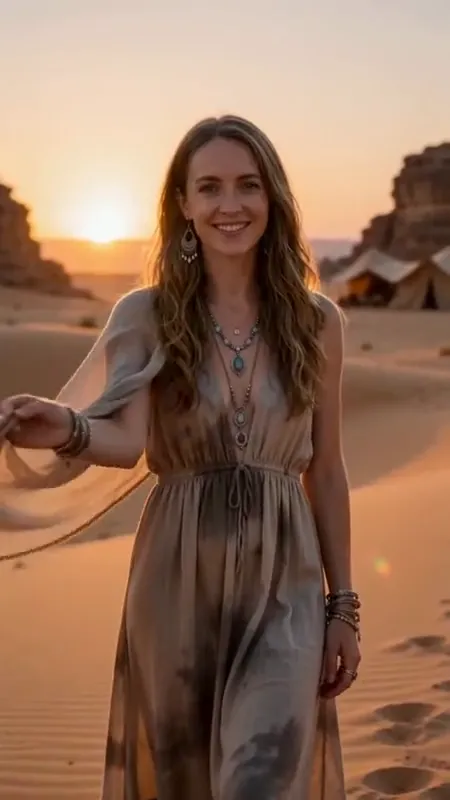
Fabric detail

Let the material set the pace.

The desert reference uses a walking model and flowing sleeves to show light fabric in motion. Adapt that idea to a smaller detail shot by naming the material, its construction and the part that moves.

  • Visible texture
  • Gentle movement
  • Product consistency

Inspect any later rendered clip against the source photo. Pay particular attention to stitching, printed graphics, buttons and changes in color.

From clothing photo to motion direction

AI fashion video prompts for clothing brands.

Choose a movement that fits your source photo. Copy a prompt or apply it directly while keeping your uploaded outfit image.

6 prompts
Two steps into the frame
Runway

Two steps into the frame

Animate the model in the uploaded fashion photo taking two measured steps forward, then settling into a relaxed runway pose. Keep the entire outfit visible. Preserve the garment color, cut, seams, print placement, fastenings and accessories. Keep the face and body proportions consistent. Use a steady camera and soft, even lighting without changing the background.

A relaxed editorial turn
Editorial

A relaxed editorial turn

The model in the uploaded fashion photo makes a small quarter turn and pauses in a natural editorial pose. Preserve the exact outfit, fabric pattern, neckline, hem and accessories. Keep the hands relaxed and visible. Move the camera very slightly in the opposite direction. Do not invent an unseen back design or change the model’s identity.

A little movement in the fabric
Fabric details

A little movement in the fabric

Create a restrained fashion detail shot from the uploaded photo. Let the visible fabric move gently with a small shift of the model’s posture. Preserve the weave, stitching, print scale, garment construction and original colors. Keep the camera close to the visible detail and finish with the fabric at rest. Do not add embellishments or alter the fit.

A still pose for the lookbook
Editorial

A still pose for the lookbook

Use the uploaded on-model photo as the visual reference. The model shifts their weight gently and relaxes one shoulder while holding a natural expression. Preserve the outfit’s neckline, silhouette, prints, fastenings and accessories. Keep the camera steady and the lighting even. Finish on a readable front pose without changing the clothing.

Show the structure of a jacket
Fabric details

Show the structure of a jacket

Create a restrained detail shot of the jacket in the uploaded fashion photo. The model makes a small shift of posture, allowing a natural fold at the sleeve. Preserve the lapels, shoulder shape, buttons, seams and fabric color. Keep the camera near the original viewing angle. Avoid adding pockets, changing fit or inventing a back design.

A vertical campaign entrance
Runway

A vertical campaign entrance

Plan a vertical 9:16 fashion shot using the uploaded full-body photo. The model takes one slow step toward the camera and pauses, keeping the outfit inside the frame. Preserve the face, garment colors, print placement, hem and shoes. Leave clear space above the head and beside the body. Hold the final pose without a cut or added text.

The three clips are motion references. These six original prompts include variations and do not reproduce the example videos exactly.

A better starting point for a clothing campaign

How to plan an AI fashion video from a photo

  1. Choose an accurate outfit photo

    Start with a sharp on-model image. Show the actual garment clearly, with enough room for the planned movement and minimal obstruction.

  2. Direct the model and material

    Choose a runway walk, editorial turn or detail shot. Describe a modest movement and list the garment features that need to stay consistent.

    Explore fashion prompts
  3. Save your fashion video brief

    Review the image, motion, crop and garment notes. Copy or download the brief for production. Video rendering is a later step.

Direction with product detail

Name the garment. Limit the movement.

When you use an AI video generator for a clothing brand, the motion brief should be specific about the product before it describes a camera effect.

The outfit
List the cut, color, material, seams, graphics and accessories that make this garment recognizable.
The movement
Choose a walk, a small turn or a detail gesture that fits the visible information in the source photo.
The review
Compare the resulting frames with the original. Check the hem, buttons, pattern repeats and color before publishing a product video.

Questions before you start

AI Fashion Model Video Generator FAQ

Reference photos, garment consistency and what you can prepare today.

What does this AI fashion model video generator do today?

It helps you prepare a fashion video brief from an on-model photo: choose motion, edit a prompt, record garment details and review the planned shot. You can copy or download the brief.

Can I use it as an AI video generator for a clothing brand?

You can plan clothing campaign clips, lookbook motion, product details and vertical social videos here. Use photos of the actual garments and record their distinctive details. Review any later rendered output against those photos before using it to represent a product.

Does this replace clothing or perform virtual try-on?

No. The workspace uses an existing on-model outfit photo as its reference. It does not place a flat-lay garment on a new model, change the outfit or verify how a garment would fit a customer.

How do I keep clothing details consistent?

Use a clear reference and explicitly name the cut, print placement, material, seams, fastenings and accessories. Ask for a small movement that does not expose large unseen areas. These instructions guide a future render but cannot guarantee exact preservation.

Which photo works best for a runway or model walk?

Choose a sharp, evenly lit image with the full outfit, hands and feet visible. Leave space around the body for the planned movement. If your photo is cropped at the waist, choose an upper-body editorial gesture rather than a full-body walk.

Can I plan vertical fashion videos for social posts?

Yes. Choose the 9:16 framing option and keep the garment away from the frame edges. A framing selection is a brief instruction; review the actual crop when the video is produced. Keep important garment details clear of any text you add later.

Are the examples results made from my uploaded photo?

No. They are motion references you can watch while choosing a direction. Your uploaded photo stays separate. Selecting an example applies its editable prompt and preserves your upload.

Can I combine fashion, jewelry and a brand outro?

Plan them as separate shots so each product stays readable. Use this page for the outfit, AI Jewelry Video for accessories and Logo Animation for the closing mark. Storyboard to Video can organize the sequence and its timing.

Give your next outfit a considered entrance.

Start with the real garment. Show it with one clear movement.

Bring your reference, refine the direction and save your creative brief.

Your brief is ready

Your images and instructions are organized. No video has been rendered or credits charged.