A warm welcome at the gate
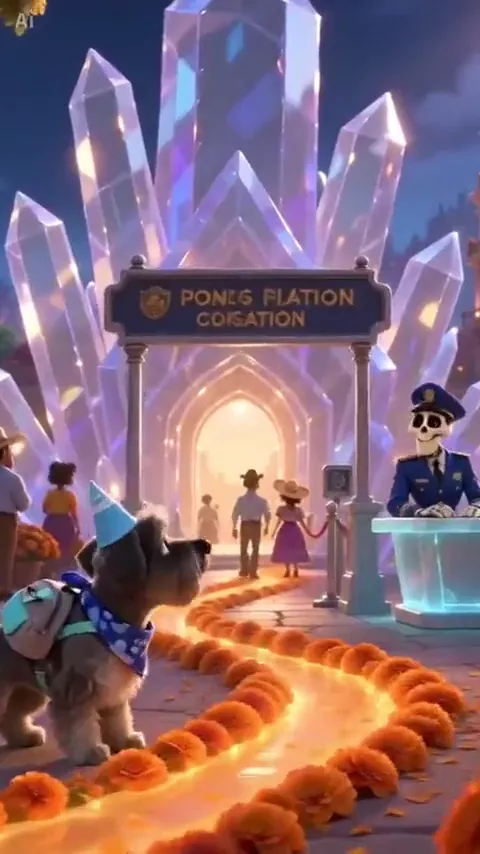
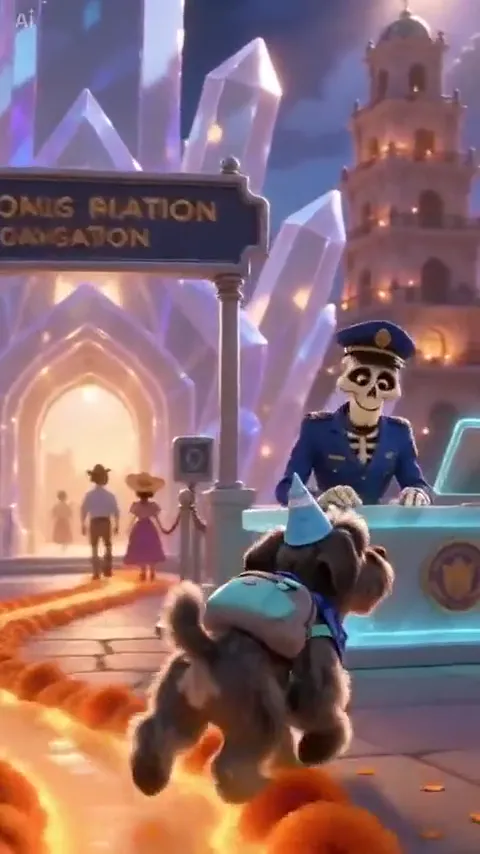
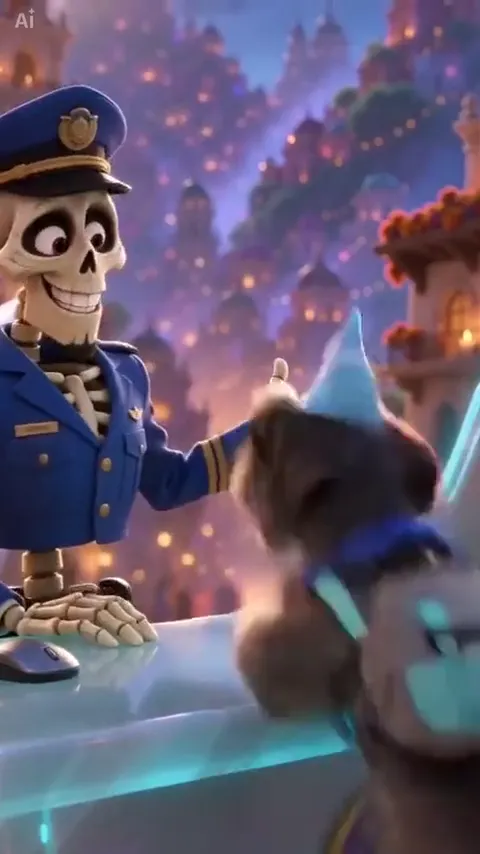
The crystal arch, glowing petals and friendly attendant give the animated version its identity. Ask for one brief welcome so your pet stays the focus.
A familiar face, a trail of marigolds and a warm welcome. Create a gentle Day of the Dead pet video from a photo of the companion you remember.
Animated pet memorial reference · 10 seconds · original audio · 9:16
Remember the face, the markings and the small things you miss.
A Day of the Dead pet video can be a quiet way to express a memory. Start with one clear photo, then choose the animated crystal gate or a lifelike marigold bridge. Keep a familiar collar, a distinctive patch of fur or the gentle way your pet looked toward you. These editable scenes make a new short video; the reference clips show two different visual interpretations of the tribute.
Create my videoThe coat markings, the way the ears sit and a slow, natural walk matter more than a complicated story. Choose a warm scene and leave room for a quiet ending.
Follow the petals. Orange marigolds draw the eye toward the crystal gate as the pet approaches.
A familiar portrait. The attendant sees the pet’s portrait, then softens into a welcoming smile.
Continue into the light. A small gesture opens the way. The pet walks on while the city glows behind it.
Prepare your photos, shape the scene and review your clip in four steps.
Compare the animated gate and the lifelike marigold bridge. Choose the feeling you want before adding a photo.
Show one pet with its eyes, coat markings and as much of its body as possible. A sharp older photo is welcome; avoid a collage or a group of animals.
Pick Crystal gate, Marigold bridge or Candlelit path. Add a collar, favorite toy or gentle movement in the styling note, then review the editable prompt.
Check the pet’s face, paws and markings in the result. Download a take you like, and add your own words or a licensed sound when sharing the tribute.
Choose the setting that feels right for your companion. Each direction keeps one pet at the center.
The crystal arch, glowing petals and friendly attendant give the animated version its identity. Ask for one brief welcome so your pet stays the focus.

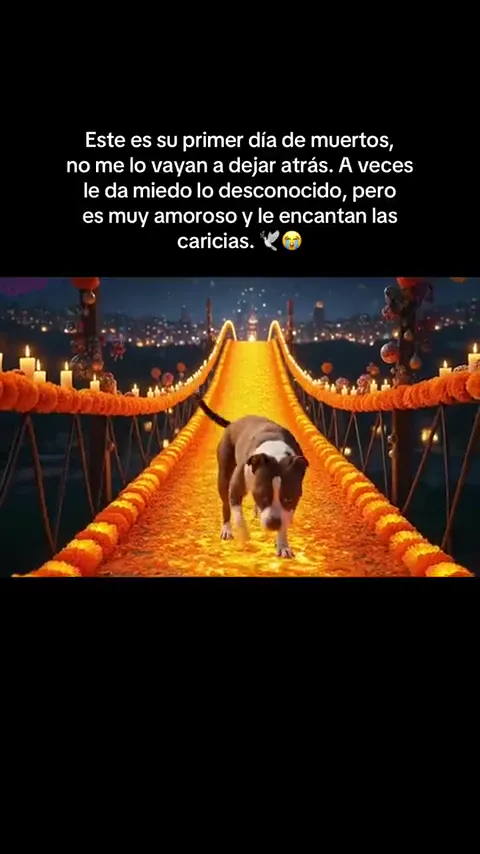
For a lifelike tribute, swap the animated city for orange flowers and a slow approach. Preserve the pet’s markings and natural gait.
You can keep the marigold light without adding extra characters. A small trail, a familiar collar and a pause are enough.
Original, editable memorial ideas. The images are reference stills, not previews of every variation.
An animated welcome at a glowing city gate.
Use the single pet in the uploaded photo as the only animal. Preserve its species, fur pattern, ears, muzzle, eyes and natural proportions. Make a warm 3D animated memorial scene at dusk. The pet pads along orange marigold petals toward a crystal arch. A friendly skeleton attendant behind a translucent desk recognizes the pet, smiles and gestures toward a softly lit city. The pet walks through the gate. Keep the attendant secondary and the pet clearly visible. Gentle camera movement, warm amber light, no frightening imagery, no added costume, no writing or logos. Vertical 9:16.
A lifelike walk toward the people who remember them.
Animate the one pet from the uploaded photo in a gentle Day of the Dead memorial. Keep the same face, species, coat colors, markings and size. A bridge covered in orange marigolds stretches into a softly glowing night. The pet walks slowly toward the camera with its natural gait, pauses close to the lens and lifts its head. Candlelight warms the petals; distant lights shimmer. One continuous low shot, realistic animal anatomy, exactly one pet, no people, no costume, no text or logos. Soft ambient sound, no speech. Vertical 9:16.
A quiet trail of petals, with no extra characters.
Use the pet in the uploaded photo, keeping its face, fur markings, species and proportions. Create a quiet cinematic memorial scene with a curved path of orange marigold petals and candles protected inside glass lanterns. The pet takes a few unhurried steps, stops beside its familiar collar resting on a low stone ledge, then looks toward a warm doorway. Keep the pet away from the candle flames. A steady low camera, gentle dusk light, no extra animals, no people, no text or logos. Vertical 9:16.
Let a familiar object carry the memory.
Preserve the single pet in the uploaded photo, including its exact coat markings and natural body shape. In a peaceful room lit by warm lanterns, a small trail of marigold petals leads to the pet's favorite toy on a cushion. The pet approaches, gives the toy one gentle sniff and settles beside it. Keep the toy simple and consistent. One continuous low-angle shot, soft natural motion, no other animals, no people, no glowing eyes, no text. Vertical 9:16.
Bring the tribute into a familiar outdoor place.
Use the one pet from the uploaded photo with unchanged species, face, fur colors and proportions. At golden hour, a garden path is lined with marigolds. The pet walks toward the camera, pauses in a patch of warm sunlight and turns its head as if hearing a familiar voice off screen. A light breeze moves the flowers. Keep the camera still and the mood affectionate. One animal only, no people entering, no speech, no text, no transformations. Vertical 9:16.
A small movement for a very personal tribute.
Animate the pet in the uploaded photo with its familiar face, ears, markings and size intact. The pet rests on a soft blanket beside a window with a small vase of orange marigolds. It breathes calmly, raises its head and gives a slow blink toward the light. Use warm evening illumination and a barely moving camera. No walking required, no additional animals, no costume, no supernatural transformation, no text or logos. Vertical 9:16.
Compare the animated gate and the lifelike bridge with their original sound. These source references are not results generated by this workspace.
Animated crystal gate
Marigold bridge reference
Explore another dance, meme or cinematic scene for your next video.
Pet photos, marigold scenes, generated duration and reference audio.
It is a pet memorial video built around orange marigolds, warm light and a gentle journey. One version shows a pet welcomed at a glowing city gate; another shows it walking over a marigold bridge toward the viewer. People also search for Día de Muertos mascotas or a pet’s first Day of the Dead.
Upload one clear pet photo, choose a scene and review the prompt in Advanced settings. Generate a short clip, then check the likeness and natural movement before downloading. The scene prompts are editable so you can keep the tribute personal.
The prompts can describe a cat, dog or another pet. Upload only one animal and name its species if needed. Use a full-body photo for walking scenes, and review the result carefully because fur details and animal movement can vary.
They are two visual takes on the pet memorial idea. The gate reference uses a stylized animated pet and a friendly skeleton attendant. The bridge reference has a lifelike animal walking toward the camera. Choose the matching scene card rather than combining both looks in one short clip.
A sharp face, visible eyes and clear coat markings matter most. For a walking scene, include the body, paws and tail. For an older close-up, the Window light idea asks for smaller movements and works with a quieter composition.
No. This workspace creates a new video from your uploaded image and the editable prompt. The reference clips help you understand the style and movement; they are not supplied as motion-reference footage to the generator.
The animated reference is about 10 seconds and the bridge reference is 8 seconds. The default EZ Standard setting creates an 8-second take, so focus on one short journey. Advanced settings shows the available duration and current credit cost.
The reference videos retain their original audio. Your generated clip does not automatically copy that recording; EZ Standard creates its own sound. Add a sound you are allowed to use in your posting app if you want a particular memorial song.
Yes. Choose Marigold bridge, Candlelit path or Window light. Those prompts keep the focus on your pet and do not add a skeleton attendant. You can also remove any detail from the prompt before generating.
Choose one photo and the gentle scene that feels right for your pet.